

GET READY. CONNECT. ENJOY.
Get to know
your Turtlebox.
A practical guide to charging, connecting and caring for your speaker. Start with the exact model and generation in your hands.
Independent guidance from Executive Advertising, researched November 11, 2026. This is not an official manual. Follow your model’s instructions and the linked manufacturer support articles.
01 / START WITH ONE SPEAKER
Which Turtlebox do you have?
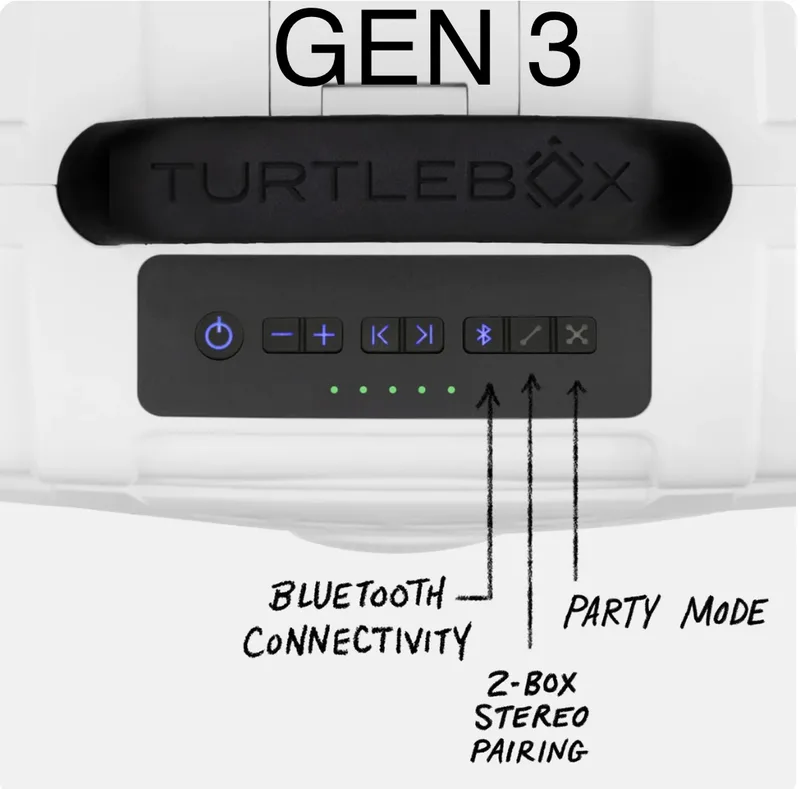
Identify Ranger, Cub, Original or Grande before following a button sequence. For Original, check the generation too. Turtlebox uses the control panel to distinguish Gen 2 from Gen 3; case color alone is not a reliable identifier.

How do I start listening?
- Check the model’s charging connection and charge the speaker as directed below.
- Switch on one speaker and use your phone’s Bluetooth settings to connect to it. Start with a single speaker before adding a second.
- Play familiar audio at a modest level, then adjust the volume for the space. Keep your phone available so you can distinguish phone playback controls from speaker controls.
- Use your model’s official manual for its power, volume, playback and Bluetooth button layout. Do not borrow long-press or reset instructions from a different model.
Which button connects multiple speakers?
On the current compatible models, the Stereo button uses two dots joined by a line. The Party Mode button uses four dots joined by an X. The official pairing instructions call for a tap, not a long press. Use the separate sequences below after connecting your phone to the lead speaker.
02 / USE THE RIGHT CONNECTION
How should I charge it?
Cub
Cub charges through USB-C. Turtlebox recommends a USB-C power source rated 30–65 W for optimal charging times. The power source affects charging speed; confirm the accessories included with your exact EA order.
Cub charging guidanceOriginal
Turtlebox’s Original charging article directs owners to the barrel charger. Its USB-C port supplies power to a phone; it does not charge the speaker. Do not assume that every USB-C socket is a charging input.
Original charging guidanceRanger & Grande
Check the charging and battery articles for your model before using a replacement adapter. A connector fitting the port does not establish that its electrical output is correct.
Ranger support · Grande supportWhat do the Ranger battery lights mean?
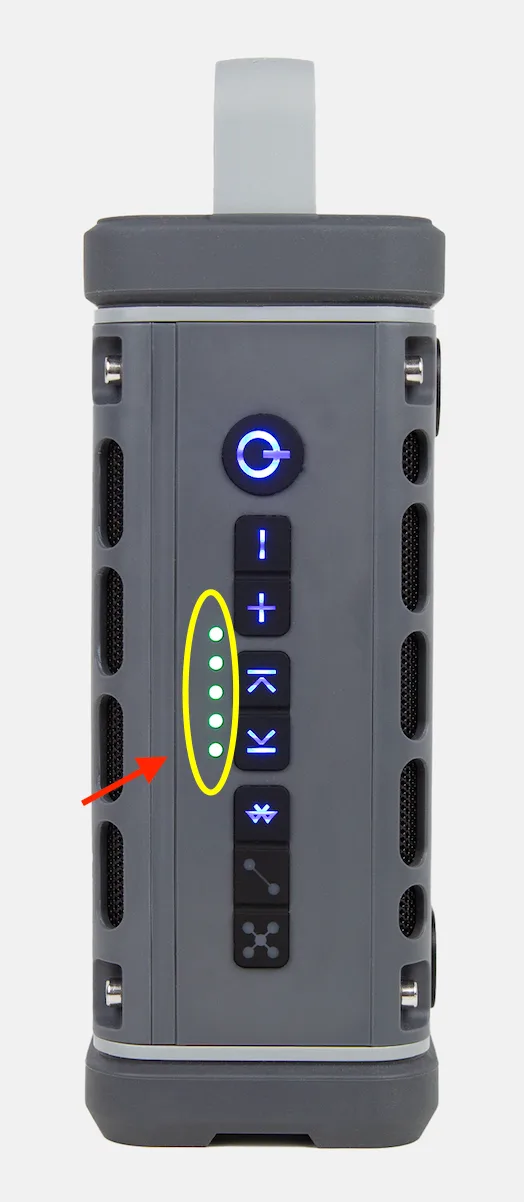
Ranger has a five-step battery gauge. Turtlebox describes the lights as 20% increments, with all five indicating a full charge. Use the marked row in the manufacturer’s photo to distinguish battery lights from the illuminated control buttons. This guidance is specific to Ranger.

Can I leave it plugged in all the time?
Turtlebox recommends unplugging after a full charge because constant charging can shorten battery life. Its general battery guidance favors the manufacturer’s charger and requires matching voltage and amperage when substituting one. Follow the model-specific charging guidance, especially Cub’s USB-C instructions.
03 / CHOOSE THE LISTENING MODE
Two channels or a shared party?
Applicability: the current Party Mode instructions identify Ranger, Cub, Original Gen 3 and Grande. Do not apply these controls to an older Original without checking its own manual. Stereo requires two of the same product; mixed models use Party Mode.
Turtlebox calls the two-speaker left/right mode True Wireless Stereo (TWS). Party Mode is the separate option for a compatible multi-speaker group. Check the model and generation first; the photo illustrates outdoor placement rather than a live status check.


How do I use Party Mode?
- Turn on the lead speaker and connect your phone to it.
- Tap its four-dot Party Mode button.
- Turn on the additional compatible speakers. If any connect to another phone, use their Bluetooth button to disconnect that device.
- Tap Party Mode on each additional speaker. Turtlebox describes a connection tone and the other lights going out on the secondary unit.
If a connected secondary speaker stays silent, the manufacturer suggests disconnecting and reconnecting it with its Party Mode button.
Official Party Mode instructions and videoHow do I use Stereo Mode?
- Use two of the same current product. Switch on the first and connect your phone.
- Tap its two-dot Stereo button.
- Switch on the second speaker and tap its Stereo button. Disconnect any other phone that has connected to it using its Bluetooth button.
- The secondary speaker’s lights go out as described in the official instructions.
If only the phone-connected speaker plays, toggle the secondary speaker’s Stereo button and pair it again.
Official Stereo Mode instructions and video04 / LOOK AFTER THE DETAILS
Water resistance needs proper care.
What does water protection mean for Cub?
The manufacturer identifies Cub as IP67-rated and buoyant, with a stated limit of 3 feet for 30 minutes. Keep its port cover closed around water, rinse after saltwater exposure, and never expose it to water or moisture while charging. Follow your exact model’s instructions; these Cub facts do not make Ranger a floating speaker.


Can my Ranger float?
No. Turtlebox says Ranger does not float. Its support page lists IP67 water protection with stated depth and time limits; this does not mean it can be charged while wet. Keep the charging flap shut around water, rinse off salt water with fresh water after use, and ensure the charging port is completely dry before connecting power. Never expose it to water or moisture while charging.
Ranger water and charging precautions →
What is the breather, and can artwork cover it?
Turtlebox identifies a small rear breather on Original, Grande and Cub. Leave it uncovered: do not place a sticker, wrap or other covering over it. This is a useful point to check during an artwork-placement discussion.
The manufacturer’s cleaning sequence keeps the charging door closed during a gentle fresh-water rinse, clears salt or sand without pressure washing, dries around the door with a towel, and then opens it for air drying. Follow the illustrated article to locate the breather on your speaker. Do not treat this as a Ranger-specific cleaning diagram.
05 / WORK THROUGH ONE CHANGE AT A TIME
Connection or sound trouble?
Bluetooth drops out around people.
Turtlebox recommends raising speakers off the ground or above a crowd on a suitable stable surface. For important events, its support team suggests a wired auxiliary connection where the model supports one. Confirm the input and cable on your actual model; this is not a promise that every speaker has an aux socket or that any connection is interruption-proof.
Official crowded-space connection advice →
My iPhone reports “pairing unsuccessful.”
Use Turtlebox’s dedicated iPhone troubleshooting article if normal pairing still fails. Its last-resort network reset removes saved Wi-Fi passwords; it is not a recommendation to erase the entire phone. Read the consequences before changing those settings.
Official iPhone pairing troubleshooting →
Should I reset the speaker?
Use the official reset instructions for the exact model. The troubleshooting directory separates Ranger, Grande and Original Gen 3 reset procedures. Keep a note of the model, phone, connection mode and what happened so support can help you reproduce the problem.
Find model-specific reset and sound troubleshooting →
How do I judge whether it sounds right?
Our practical suggestion: test with the same familiar song or voice recording, in the intended location, before an event. Change one thing at a time—placement, volume or connection—so you can hear what helped. The size and sound guide distinguishes manufacturer ratings from attributed listening impressions; a loudness number alone does not settle sound quality.
06 / KEEP THE RIGHT REFERENCE HANDY
Official help for your exact speaker.
Ranger manual download page · All official speaker FAQs
What if it needs a warranty claim?
Turtlebox publishes one-year manufacturer coverage, with exclusions including engraving performed outside Turtlebox Audio LLC. EA’s decoration provider and your decorated order’s eligibility need confirmation; do not assume a replacement includes your artwork. See our warranty and claims guide for the terms and claim destination.
For quote artwork and product selection, return to the Turtlebox Buying Guides. This help page focuses on using the speaker.